Posts

Showing posts with the label blackbox

TOP Dark Web Hidden Services

Image
 What is the dark web? The dark web is a part of the internet that isn't indexed by search engines. You've no doubt heard talk of the “dark web” as a hotbed of criminal activity — and it is. Here are the TOP Dark Web Hidden Services  1. RAPTOR  Raptor is a trusted darknet markets link directory founded in May 2019, featuring deep web market links, trusted vendors list, scammers list, and a live chat. URL: raptortiabg7uyez.onion 2. DARK ZONE Dark web Hackers Zone (Dark Zone) is a darknet Hackers for hire &services market place accepting BTC. They provide DDOS Attacks, Hacking Services, Project Hiring, and a lot more. All Hackers can join the market as a service vendor. The dark web hackers zone also provides cardi services for various products. URL: darkzonebry27nxa.onion DISCLAIMER  We do not promote and hacker or website we are not responsible for any of the loss or crime. This information provided is for general-purpose to gain knowledge and to make aware...
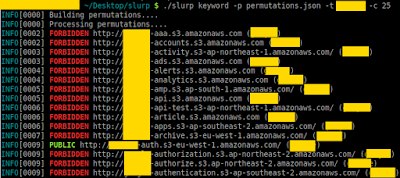
Slurp – Amazon AWS S3 Bucket Enumerator

Image
Detail information about Slurp--Amazon AWS S3 Bucket Enumerator Slurp is a blackbox/whitebox S3 bucket enumerator written in Go that can use a permutations list to scan from an external perspective or an AWS API to scan internally. There are two modes that this tool operates at; blackbox and whitebox mode. Whitebox mode (or internal) is significantly faster than blackbox (external) mode. Blackbox (external) In this mode, you are using the permutations list to conduct scans. It will return false positives and there is NO WAY to link the buckets to an actual AWS account. Whitebox (internal) In this mode, you are using the AWS API with credentials on a specific account that you own to see what is open. This method pulls all S3 buckets and checks Policy/ACL permissions. Your credentials should be in ~/.aws/credentials. Features: The main features of Slurp are: 1. Scan via domain(s); you can target a single domain or a list of domains 2. Scan via keyword(s); you ca...